IOS
Apple Vision Pro Spatial Widgets seamlessly integrate applications with the physical environment.
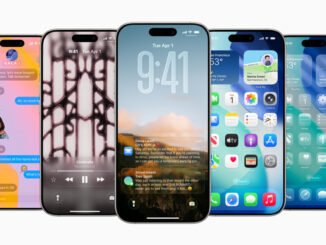
Apple elevates the iPhone experience with iOS 26
What is Apple HomeOS? Rumors, Release Date, and HomePod Insights
Overview of HomeOS
Apple HomeOS is anticipated as a new operating system designed to enhance smart home integration, particularly with devices like the HomePod. This operating system aims to streamline device management, improve automation, and offer a unified interface for various smart home products.
Rumors and Speculation
While details remain scarce, discussions around HomeOS suggest a focus on increased compatibility with third-party devices and enhanced user experiences. Speculations hint at features that could revolutionize how users interact with their smart home ecosystems, possibly making it easier to manage everything from lighting to security systems.
Expected Release Date
Though an official launch date has not been confirmed, many are anticipating an announcement at Apple’s upcoming events. Observers are hopeful for more definitive information within the next year.
HomePod Connection
The HomePod is expected to play a central role in the HomeOS ecosystem, acting as a hub for controlling various smart devices. With the potential integration of HomeOS, users may experience improved functionality, voice control, and enhanced sound quality as part of a seamless smart home experience.
Stay tuned for more updates as Apple unveils further details about HomeOS and its capabilities.
Apple HomeOS is anticipated as a new operating system designed to enhance smart home integration, particularly with devices like the HomePod. This operating system aims to streamline device management, improve automation, and offer a unified interface for various smart home products.
While details remain scarce, discussions around HomeOS suggest a focus on increased compatibility with third-party devices and enhanced user experiences. Speculations hint at features that could revolutionize how users interact with their smart home ecosystems, possibly making it easier to manage everything from lighting to security systems.
Though an official launch date has not been confirmed, many are anticipating an announcement at Apple’s upcoming events. Observers are hopeful for more definitive information within the next year.
The HomePod is expected to play a central role in the HomeOS ecosystem, acting as a hub for controlling various smart devices. With the potential integration of HomeOS, users may experience improved functionality, voice control, and enhanced sound quality as part of a seamless smart home experience.
How to Resolve the iOS 18.5 Mail App Crash
If you’re experiencing crashes with the Mail app on iOS 18.5, follow these steps to troubleshoot and fix the issue:
Restart Your Device: Hold down the power button, slide to power off, and then turn it back on.
Update iOS: Ensure you have the latest updates by going to Settings > General > Software Update.
Check Mail Settings: Go to Settings > Mail > Accounts and ensure your email accounts are configured correctly.
Remove and Re-add Accounts: If a specific account is causing issues, try removing it under Settings > Mail > Accounts, and then re-add it.
Clear Mail App Cache: Close the Mail app completely, then reopen it to clear temporary data.
Reset All Settings: Go to Settings > General > Transfer or Reset iPhone > Reset > Reset All Settings. This won’t delete your data but will reset system settings.
- Contact Apple Support: If the issue persists, reach out to Apple Support for further assistance.
By following these steps, you should be able to resolve the Mail app crashing issue on iOS 18.5.
Restart Your Device: Hold down the power button, slide to power off, and then turn it back on.
Update iOS: Ensure you have the latest updates by going to Settings > General > Software Update.
Check Mail Settings: Go to Settings > Mail > Accounts and ensure your email accounts are configured correctly.
Remove and Re-add Accounts: If a specific account is causing issues, try removing it under Settings > Mail > Accounts, and then re-add it.
Clear Mail App Cache: Close the Mail app completely, then reopen it to clear temporary data.
Reset All Settings: Go to Settings > General > Transfer or Reset iPhone > Reset > Reset All Settings. This won’t delete your data but will reset system settings.
iPadOS 26 Rumors: Enhanced Multitasking, Redesign, and More
Exciting rumors are circulating about iPadOS 26, with anticipated improvements in multitasking features, a fresh redesign, and additional enhancements. Stay tuned for updates as we dive into what’s expected in the upcoming release!
Global App Store helps developers reach new heights
Apple Arcade welcomes nine new games
Apple Intelligence did not accelerate the adoption of iOS 18.